


It all started on a normal Thursday… except it was anything but. Raha had officially posted about the focus hackathon and we started getting BUSYY
At work
Our team decided that we were going to build a VR application for astronauts up in space with the purpose of connecting them to Earth’s nature and improving their mental health.
And we decided to have three options for the app: Audio, Video and Both. Audio refers to a scene with only calming music, Video refers to one with only the environment and Both refers to a scene with both calming music and the environment
I was tasked with creating a VR User Interface and environments to navigate through different scenes. Follow along to see how I did it with Unity
First, I created 4 scenes: one for the menu and the other three for the options.
Main menu: Scene 1
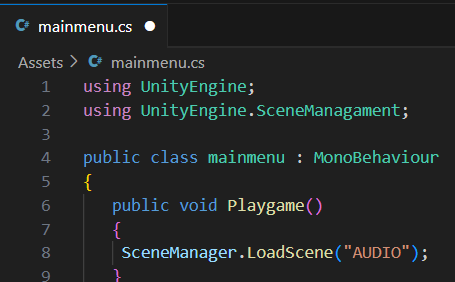
I created a canvas and started working on the buttons. I had some trouble trying to figure out how to script the buttons in such a way that it leads to another scene, but eventually got past that bit. The rest was just making canva designs as sprites and adding them to the game objects in the scene
Fun fact: I was actually struggling for hours trying to figure out errors within my script as the On Click Event section- which is nothing but a way to make the button do the things we want when clicked- wasn’t showing the function that I wanted. And.. this was the error.
Audio: Scene 2
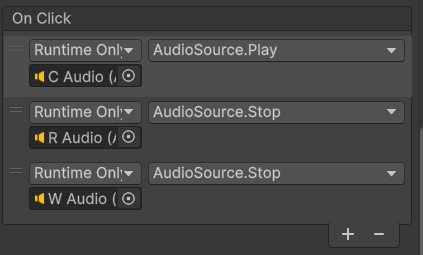
I started off with making a dashboard with different buttons for different calming sounds (e.g. Chirping, Beach waves, etc.) and made an audio game object for each sound. Then, I took these game objects with the audio and inserted them into the On click section for its corresponding button and functioned it so that when the button is clicked, the audio will play automatically.
I ran into some trouble with this part. I clicked a button and the audio was there but when I clicked another button, the previous audio didn’t stop so all the audios were overlapping. But I figured it out by using the stop function for the other two audios.
Video: Scene 3
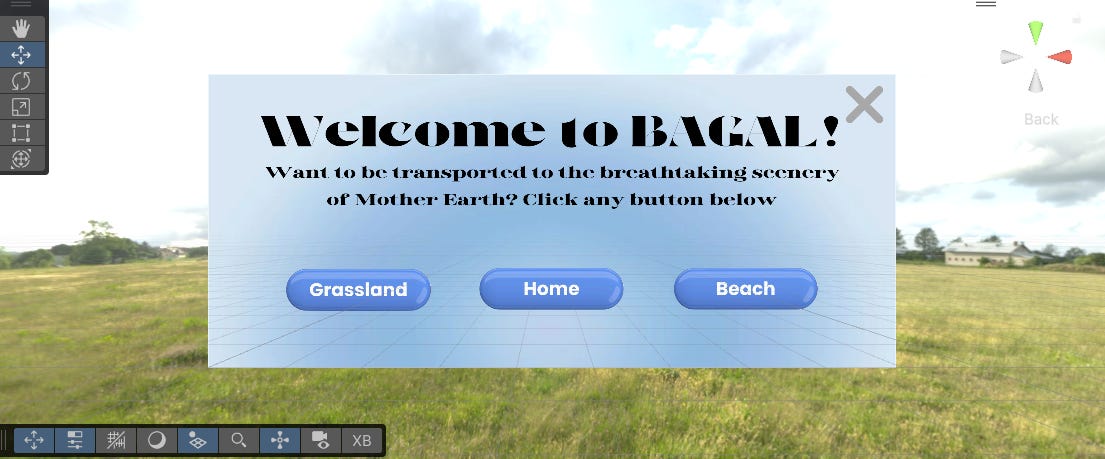
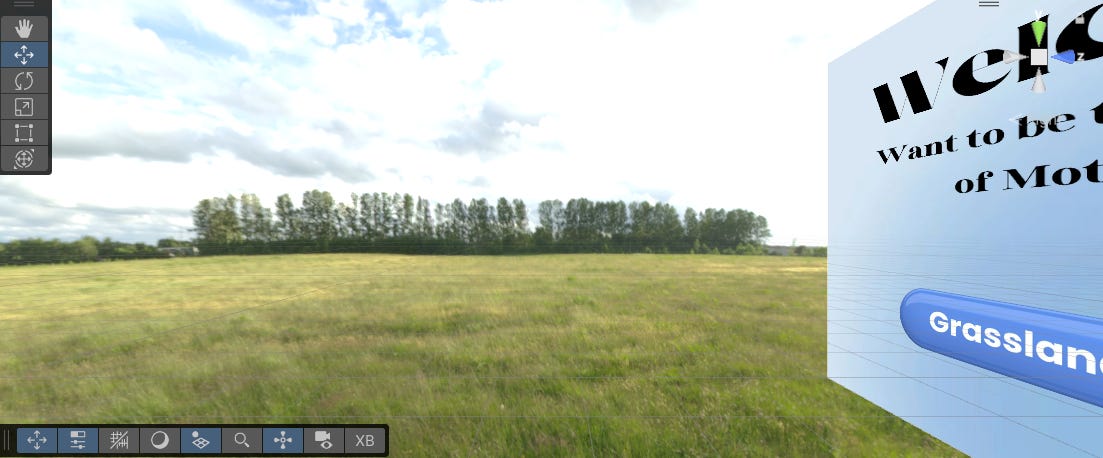
This part was the most confusing. My initial vision was to create a dashboard and when they click let’s say ‘Grasslands’, it would move the camera beyond the dashboard so they can see the landscape. I tried to create a terrain landscape from start, but I figured I’m way too new to Unity and I had a tight deadline so I imported the landscape from the Unity Asset store.
But it was too pixelated so I had to zoom out a lot and also, I couldn’t figure out a way to make the button on the dashboard to move the camera once its clicked- it jus wasn’t working. I tried changing the script and triple checking it, but nothing worked. So I created another camera to be placed behind the dashboard and assigned it another display. This way even though the button wasn’t functional, I could still see the landscape with another display
Both: Scene 4
This is where we thought of including both the Audio and Visuals. I had little turbulence here as I just copy pasted the objects from the hierarchy of the AUDIO and VIDEO scene and I just made little changes in the script and it turned out pretty good!
I still wish I had time to design a different environment for this scene as to differentiate it from the VIDEO scene, but time was ticking fast, so I scaled it down.
Exit
By now, everything was almost done and I realised I had a way of going into a scene but no way of coming out, which was essential if I wanted to jump between different scenes. So, at last, I added an exit button on top of all dashboards in all scenes by scripting it to go back to the MENU and added a ‘grey cross’ sprite to represent the exit. Now, when I switch on game mode, I can come out of the scene too!
Here’s a video of the prototype in game mode! (Excuse the bad audio, it’s an issue with the laptop)
Reflections
From losing all my edits because I forgot to switch off game mode to desperately relying on close friend for everything that I need (ChatGPT), I’ve faced a lot of challenges making this project.
But I started learning Unity just two weeks back and I was genuinely amazed by the fact that I was even able to get it done. So kudos there!
I learnt the ‘figure it out’ mindset- it was more like I was forced into it tho lol. Unity isn’t Canva or any other platforms where I can find help online for every little problem easily. I was racking my brain out trying to see what went wrong and although the internet helped a lot, it didn’t solve much of my issues. So I had to figure stuff out for myself and it didn’t feel easy, maybe even overwhelming at times. But it didn’t feel wrong either, I learnt a lot of things in Unity with this project, from creating UI to scripts and functions. More on this in my monthly newsletter, which if you haven’t checked out- it’s here.
A huge shoutout to my team: Bhavishyaa Vignesh, Anaiah Singh, Aditi Nethi and Lida Aikaterinari for working with me on this project and helping me through it all. Without their support, I wouldn’t have been able to focus on my thing
Also a very huge shoutout to Sai Kiran who helped me out when I was having trouble with Unity. Check his page out: thearvrguy
This is so cool! Do you plan working more with your team on this project?
Youuur truly amazing Geethika. Keep going!!
mindblowing work by all of uu